Sunday, January 11, 2009
Visitors from down under
This past week my very good friend Alanna and her boyfriend Neil stayed with us. They are in LA on their way back to Australia from Spain. It was so nice to spend time catching up and hearing about their adventures. Not sure how I managed to not take a single photo of their visit. You'll just have to picture us sitting in our living room, enjoying a glass of wine, the boys playing Rock Band.

Thursday, January 8, 2009
Editing Photos - Picasa!!!
 Alrighty, we all have a zillion photos from our shiny new digital cameras. I would like to share with you my methodology for processing and sharing those photos. As many of you know, Picasa3 (www.picasa.com) is my favorite photo editing and management program, and I bug you all to use it. Whenever I get a new batch of photos to edit, I run through 9 very quick and easy steps:
1) Import: Import the photos into your "My Photos" directory, or wherever you save your pics. Picasa has an import tool, but I prefer to do this manually.
2) Correct: Click on the new folder so that all of the pics are selected. In the menu, click "Picture", then "Batch Edit", then "I'm feeling lucky". This auto-corrects white balance and colors. Pictures ALWAYS look better after running this. Give it a moment to update your thumbnails.
3) Describe: Give your folder a very descriptive name, and type in a little blurb about the event(s) in your folder.
4) Remove duplicates: Time to go through the photos. Double click on the first photo. For duplicates, pick the best one and delete the others. If you keep more than one, make sure that there's a compelling reason.
5) Crop, crop, crop! For me, 99% of these photos will only be seen on a computer screen. They will look better if you simply crop out all of the unnecessary stuff so that the things you want to see will be BIGGER. Focus on the faces. Don't be afraid to crop into other aspect ratios, but I would recommend nothing taller and skinnier than a typical 4x6 portrait. That means that you should shoot for 4x6/3x5 aspects, square, or something panoramic.
Picasa3 has face detection technology, so when you click the crop button, it gives you 3 suggestions of different cropping around the face in your pic. The suggestions also tend to automatically exclude the boring stuff, like the monochromatic elements at the edges around your subjects. The suggestions are not perfect, but they make editting easier and faster.
6) Finish: Apply other finishing effects to the photos. There's one click stuff for other effects like sepia or b&w, red eye reduction, and even simple retouching. Not strictly necessary, but can be great to mix it up a little.
7) More describing: Add captions for as many photos as you can. Photos tell a story, but they don't always say everything that needs to be said.
8) Feel lucky, again: Select all the photos again (your cropped, captioned, tagged, de-duped photos, hopefully!), and re-run the "I'm feeling lucky" edit from step 2. Whenever you crop or apply effects to a picture, that can change how the white or color balance looks, so if you re-run this, the pictures will probably look just a little bit better.
9) Upload! Click "Sync to Web" to share the photos. It may ask you to set up a google account for this if you don't have one. Once it finishes uploading the pictures, click the "Web Albums" button and send the link to your fam and friends or put it in your blog. Because of the "sync" feature, if you make changes to the picture (changing captions, retouch, crop, etc...", it will automatically update the web album too!
Voila! You are done! I hope that helps you save your memories.
One last step that I like to do is click the "save" button (to commit your updates to the pic). Don't worry - ALL edits are undo-able, even saving. Normally, picasa effects are "applied" to the original photos each time you view it, so when you view in Windows or Photoshop, you wouldn't see you changes. This last step will make every app show your nice pics the same way that Picasa does, and will make them ready to archive.
See this page for more tips, including tagging, geotagging, gift CDs, Flickr, and keyboard shortcuts.
One last thing, it just came out for mac, and it plays nice with iPhoto. Check it out!
Friday, January 2, 2009
Mammoth for New Years
 We spent New Years in Mammoth this year (as in some years past) with a few friends and had a great time! The first day out on the mountain was *awesome* - perfect conditions. The second day was windy with many of our favorite lifts closed so we took the day to hang out in the condo, play lots of Scrabble, and check out Tamarack Lodge (build in 1924). I was back on the slopes again on the third day with some fresh powder, but Aaron wasn't feeling well so he headed back to the condo pretty early. We didn't snowboard on Sunday so we took our time getting back to LA and stopped at the Manzanar Relocation Camp. It is an interesting piece of war history and had a much nicer (quality, not content) exhibit than any of us were expecting. For many, many photos from the trip click here.
Thursday, December 25, 2008
Merry Christmas!

This year we stayed in LA for Christmas and got to spend some quality time with family. Christmas Eve we were in Woodland Hills with my dad and most of Julie's family - Susan was an excellent hostess! It was just the two of us on Christmas morning and then we headed up to Palos Verdes for Christmas dinner at Auntie Linda's place - another fantastic hostess! Aaron and I are sporting our new scarves in this photo. More from Christmas dinner are here.
Wednesday, December 24, 2008
Santa Monica Mountains
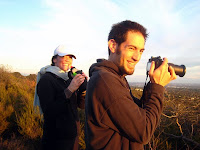
Yesterday afternoon Aaron, Minh (friend from Austin who was visiting) and I headed to the Santa Monica Mountains for a hike. The weather was perfect - sunny with a chill in the air. I somehow missed one of the turns and we ended up scaling the canyon rather than the nice stroll we had envisioned. After about 45 mins of a nearly vertical climb through a very poorly  cleared 'path', we made it to the top and enjoyed the views of the entire LA basin. We only had to trade 2 pairs of sunglasses, a torn shirt, and a torn pair of pants for our safety. Luckily we didn't have to come down the same way we went up.
cleared 'path', we made it to the top and enjoyed the views of the entire LA basin. We only had to trade 2 pairs of sunglasses, a torn shirt, and a torn pair of pants for our safety. Luckily we didn't have to come down the same way we went up.
Saturday, December 20, 2008
Secret Date
 This evening I treated Aaron to a 'secret date.' A few weeks ago I had seen a poster for an L.A. Unfolded exhibit at the Central Library. It was showcasing old maps of LA... exactly right up his alley. Rather than telling him any details about it I simply told him to be ready at 3:30 on Dec 20. I was taking my man out! He
 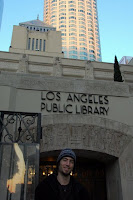 treats me to many surprises - which I love - so it's about time I returned the favor.
I fed him hints on the bus ride downtown (whoa - bus riders in LA on a weekend - whoa) and I think he was pleased once he figured it out. The exhibit was pretty interesting. Maps dated back to when the city was first being formed. I got a kick reading the
 insurance map that detailed the names and occupations of each of the home owners through the streets of historic downtown.
The gallery viewing was followed by dinner at McCormick's (AAFA auction prize) in the US Bank tower across the street. We caught the bus home and were surprised to see the sam e driver who brought us downtown. He recognized us, too, which was fun.
e driver who brought us downtown. He recognized us, too, which was fun.I don't really consider myself an Angelino, even though I've lived here for the past 4 years, but this evening
 brought me a little closer to admitting it. I'm a bus riding, public library patron with a bit of historical perspective and a little bit more room in my heart for this place called La La Land.
Sunday, December 14, 2008
4:00 am does exist
 Just in case anyone was wondering, 4:00 am does in fact exist. Aaron and I checked this morning - that's what time we woke up to get places in time for the Long Beach Bay Series this morning. That's right, I have started rowing again!
  A month or two ago, in search for a 'new' hobby/exercise routine, I found that the UCLA recreation center offers skulling classes and rentals - even to non students/alumni - for a decent price. On my 4th and last class I learned that there were efforts to put together a masters program out of the Marina Aquatic Center where the UCLA classes were taking place. BTW, 'masters' is in no way an indication of skill level, it just lets everyone know that you're past college.
 So, 7 years since my days rowing with Beach Crew (check them out, they look all professional now - website and all) and I find myself on a four in Long Beach for a race. It was so fun to be down at the Long Beach boathouse - I saw a few familiar faces, though not as many as I was hoping. A special thank you to Kelley for getting out of bed at an unreasonable hour to watch us pass in front of her apartment!
 All said and done I think our boat did pretty well this morning. The other ladies are much better than I am but I'm not beating myself up over it. I figure once I have more than oh, 3 weeks of 'training' under my belt that I will get up to speed and feel like a better contributor to the team.
Subscribe to:
Posts (Atom)


